 Appleak
Best App Marketing Tools in 2026
Marketing an app is five jobs, not one: the store listing, paid ads, creators, listening to users and keeping an eye on rivals. No single tool does all five best. Here is which tools do which, what they cost to start, and where Appleak fits. We make Appleak, so check each tool’s own site too.
In short
- 01App marketing splits into five jobs: the store listing, paid ads, creators and UGC, what users say, and what rivals change.
- 02The ASO suites (AppTweak, MobileAction, Appfigures) are strongest on the listing; Appleak, AppKittie and Peekly read rivals’ ads and creator videos.
- 03None of them runs your ads or counts your own installs: the networks’ own ad managers and an attribution tool do that.
By Appleak · 21 Nov 2026
Why one tool is rarely enough
An app is found in three places: the store’s own search and charts, paid ads on the big networks, and the videos people post. Each place has its own data, and most tools were built for one of them. ASO tools grew out of store search, ad intelligence out of the ad networks, creator tools out of TikTok and Instagram.
So the useful question is not which tool is best, but which jobs you have this month, and which tool does those jobs at a price a small team can carry.
The five jobs of app marketing
- Store listing (ASO)
- The words people search, where you rank for them, and the title, subtitle and screenshots that turn a visit into an install.
- Paid ads
- What rivals pay to say on Meta, TikTok, YouTube, Google, Apple Search Ads and Snapchat, and for how long, before you spend your own budget.
- Creators and UGC
- Who already posts about your kind of app, and which video formats travel.
- Listening
- What users of your app and of rivals’ apps praise and fault in reviews, and what people ask for on Reddit, X and the video platforms.
- Watching rivals
- When a competitor changes its price, ships a version, climbs a chart or starts new ads.
Which tools do which job
| The job | Tools whose sites say they do it | In Appleak |
|---|---|---|
| Store listing (ASO) | AppTweak, MobileAction and Appfigures are built around it; AppKittie and Peekly have keyword tools too. | Keywords: estimated popularity, difficulty, your chance and daily rank tracking |
| Paid ads | Sensor Tower and AppMagic at market scale; AppKittie with spend by country; Peekly with run duration and EU reach; MobileAction with a free ad library. | Ad Search on six networks, each ad’s hook read out |
| Creators and UGC | AppKittie and Peekly, with organic videos per app. | Influencer Search and UGC videos |
| Listening to users | Most track ratings and reviews; MobileAction adds sentiment and AI replies. | Category reports, Review Search and Market Signals |
| Watching rivals | Peekly and AppKittie have app trackers with alerts; MobileAction monitors rivals’ updates and creatives; AppTweak alerts on keywords. | Market Watch: rules, an inbox and a weekly digest |
What two of the jobs look like in Appleak
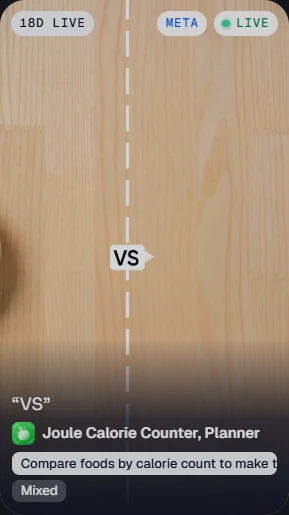
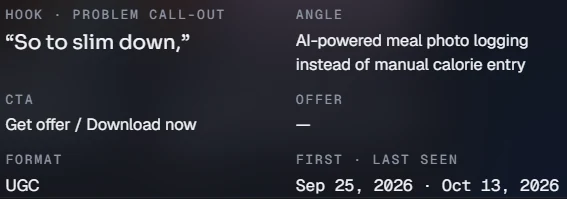
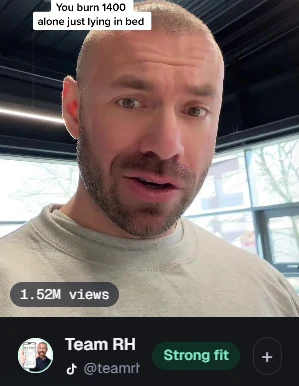
Paid ads and creators, as Appleak shows them. Both pictures are cropped from real searches; nothing on them was drawn in.
The six tools, side by side
| Feature | Appleak | AppTweak | MobileAction | Appfigures | AppKittie | Peekly |
|---|---|---|---|---|---|---|
| Asking and answers | ||||||
| Natural-language search | Yes: Ask in plain words: the question opens the page that answers it, and a research report answers it with the evidence. | Partly: AI agents for reporting and guidance; an ASO Agent on Enterprise. | Yes: An AI assistant for Apple Ads and ASO, and an MCP server. | Not confirmed | Yes: Connect ChatGPT, Claude or another assistant and ask in your own language. | Not confirmed |
| App teardowns and review verdicts | Yes: A verdict from an app’s reviews, with sentiment, its ads, its creators and its charts. | Partly: Ratings and reviews analysis, and competitor metadata. | Partly: App market profiles with ratings, reviews and download trends. | Partly: Tracks reviews. | Partly: A profile per app: revenue, ads, videos, keywords, reviews and onboarding. | Partly: A full profile per app, with its ratings and reviews. |
| Review search and category reports | Yes: Search every collected review and get themes with counts and quotes; a category report reads a whole field’s reviews. | Partly: Ratings and reviews analysis, and an App Reviews Manager. | Partly: Rating, review and sentiment analysis, with AI review replies. | Partly: Review tracking for your own apps. | Partly: A review tracker. | Partly: Ratings and reviews per app. |
| Marketing proof | ||||||
| Video ad search | Yes: Ads on Meta, TikTok, YouTube, Google, Apple and Snapchat, each read for its hook, angle and offer, with how long it has run. | Partly: Apple Ads tools (Campaign Manager); Apple Ads keyword intelligence on Enterprise. | Partly: A free ad library; full Ad Intelligence across 45+ networks and DSPs on Enterprise. | Partly: Apple Ads intelligence. | Yes: Winning-ads library, with estimated ad spend by country. | Yes: 560K+ ads with run duration, EU reach and target countries. |
| Creators | Yes: Creators by niche with followers, engagement and a fit score, and UGC videos from TikTok, Instagram, Facebook and YouTube Shorts. | Not confirmed | Not confirmed | Not confirmed | Yes: Viral TikTok, Instagram and YouTube Shorts videos per app. | Yes: Organic TikTok, Reels and Shorts per app, with creators and engagement. |
| Buyer intent on seven social platforms | Yes: Market Signals sorts public mentions of a brand, its rivals or a niche into leads, bugs, ideas and praise. | Not confirmed | Not confirmed | Not confirmed | Not confirmed | Not confirmed |
| Store numbers | ||||||
| Revenue and download estimates | Yes: Revenue and download estimates in a teardown and in research answers. Installs are a modelled range, not a count. | Yes: Download and revenue estimates, from Essential. | Yes: Revenue and download estimates, with DAU and MAU. | Yes: Competitor download and revenue estimates. | Yes: Revenue and download estimates for 4.5M+ apps. | Yes: Revenue and downloads for every app; its method draws on Sensor Tower figures, it says. |
| Rankings | Yes: Top charts, new-release charts, where an app charts, and the store rank of every keyword you track, checked daily. | Yes: Keyword rank tracking. | Yes: Keyword ranks, featured apps and market leaders. | Yes: Rank tracking. | Yes: Global rankings. | Yes: Free, paid and grossing charts in 150+ countries, with rank moves. |
| ASO keywords | Yes: Keyword research for the App Store and Google Play in 36 countries: estimated popularity, difficulty, your chance and the apps ranking for each, a verdict per keyword, daily rank tracking and the App Store keyword field written for you. | Yes: Keyword research with volume and difficulty. | Yes: Keyword research with volume and difficulty, and AI keyword suggestions. | Yes: ASO keywords. | Yes: Keyword popularity and difficulty, and an ASO tracker. | Yes: Keyword explorer: difficulty, demand and the store results for a keyword. |
| Paywalls and onboarding | Partly: Paywall screens and pricing inside a teardown. No library of onboarding flows. | Partly: Store creatives, custom product pages and in-app events, on Expand. | Partly: Store creatives, custom product pages and in-app events, from Pro. | Not confirmed | Yes: Onboarding library, with paywall screens step by step. | Yes: 18K+ captured paywalls, and onboarding flows screen by screen. |
| Keeping up | ||||||
| Monitoring and alerts | Yes: A watchlist with rules, an inbox of changes and a weekly digest. | Yes: Keyword tracking, with Slack and email alerts from Grow. | Yes: Store monitoring of rivals’ updates and creatives; Slack and email alerts. | Yes: Tracks your apps’ sales, ranks, reviews and featuring. | Yes: Trackers for keywords, reviews and ad spend. | Yes: AppTracker: unlimited apps, with alerts. |
| A growth plan for your own app | Yes: App coach: where your app stands, the platforms that suit it, what ads and posts to make and a plan for the week. | Not confirmed | Partly: AI guidance on next ASO steps, and paid managed ASO and Apple Ads services. | Not confirmed | Not confirmed | Not confirmed |
| API and MCP server | Yes: A REST API and an MCP server on every paid plan, so a script or an AI assistant can run the same research. | Yes: An API, beside its ASO and Apple Ads products. | Yes: An MCP server, and an API through sales. | Not confirmed | Yes: An API with 5,000 credits a month, and ChatGPT or Claude connected to it. | Not confirmed |
| Buying it | ||||||
| Self-serve pricing | Yes: Three plans, from $25/month, bought online. No sales call. | Yes: Three tiers online; enterprise is custom. | Yes: Three ASO plans bought online; Enterprise, ad intelligence and the API through sales. | Yes: Tiers bought online. | Yes: One plan, bought online. | Yes: One Pro plan, bought online. |
| Free plan or trial | Partly: Free to browse: every page opens without paying. Running a search, a report or a teardown needs a paid plan. | Partly: 7-day free trial. | Yes: A free Apple Ads campaign manager plan, a free ad library and 7-day trials. | Yes: Free Starter plan. | Not confirmed: No free plan or trial on its pricing page. | Yes: Free limited account. |
| In full | 13 of 15 | 6 of 15 | 8 of 15 | 6 of 15 | 10 of 15 | 9 of 15 |


Rivals’ ads on six networks, the creators who post about a niche and what users complain about, from one question.
Covers13 of 15From $25/moApp-market research you ask for in plain words. One question returns the proof behind the answer: a verdict from the reviews, the ads an app runs, the creators posting about it and where it charts.
- Best for
- Indie founders, solo developers and small studios deciding what to build or how to market it.
- Pricing
- Indie $25/month, Builder $49/month, Studio $75/month. Bought online. Appleak is free to browse; running a search or a report needs a paid plan.
- Key features
- Ask in plain words: “show me ads for calorie tracking apps”
- App teardowns with a verdict from the reviews, and research reports that answer one question with the evidence
- Ad Search on Meta, TikTok, YouTube, Google, Apple and Snapchat: days live, the hook and angle read out
- Creators by niche, and UGC videos from TikTok, Instagram, Facebook and YouTube Shorts
- Category reports that read and tag the reviews of a whole field
- Keywords: App Store and Google Play keyword research with popularity, difficulty and your chance, daily rank tracking and the keyword field written for you
- Market Watch: rules, an inbox of changes and a weekly digest
- Market Signals on Reddit, X, YouTube, TikTok, Instagram, Facebook and LinkedIn, and App coach’s weekly plan for your own app
- An API and an MCP server, so a script or an AI assistant can ask too
Pros
- One question in, compiled proof out
- Shows marketing, not only store numbers: ads, hooks, creators
- Self-serve, with no sales call
Cons
- Keyword popularity is an estimate shown as a band, not a search-volume count, read one country at a time
- Paywalls only inside a teardown; no onboarding-flow library
- Credits, not unlimited: each new run spends from the month’s allowance
- A newer product: its own stored history of charts, ratings and ads goes back months, not years
The deepest keyword work of the group, for teams whose main channel is App Store search.
Covers6 of 15From $79/moAn ASO-first platform: keyword research and tracking with volume and difficulty, download and revenue estimates, competitor metadata and store creatives, ratings and reviews analysis and AI reporting agents, beside Apple Ads, reviews-management and market-intelligence products and an API.
- Best for
- ASO specialists optimising store listings.
- Pricing
- Three self-serve tiers priced by how many apps you follow, each with a 7-day trial, and custom pricing for enterprise. Essential: $79/month. Grow: $249/month. Expand: $499/month. Enterprise: Custom.
- Key features
- Keyword research and tracking with volume and difficulty
- Download and revenue estimates
- Competitor metadata, store creatives and reviews analysis
- Reporting Studio and AI agents
- Apple Ads, reviews-management and market-intelligence products, and an API
Pros
- Deep keyword research and rank tracking
- Store creatives, custom product pages and in-app events explored
- An API, and a 7-day trial
Cons
- ASO-first: less on marketing outside the store listing
- $99 a month to start month to month, and the price rises with every app you follow
Store listing work and an Apple Ads campaign manager, with a low price to start on a yearly bill.
Covers8 of 15From $12.50/moASO and Apple Ads tools: keyword research with volume and difficulty, download and revenue estimates, review analysis with AI replies, store monitoring and an Apple Ads campaign manager with AI bidding, plus an AI assistant, an MCP server, an ad intelligence library and an API. An InMobi company.
- Best for
- Teams working on their store listing and their Apple Ads campaigns.
- Pricing
- Four ASO Intelligence plans: three bought online, each with a 7-day trial that needs a card, and Enterprise through sales. Paying yearly saves two months. Lite: $12.5/month. Basic: $59/month. Pro: $199/month. Enterprise: Contact us.
- Key features
- ASO keyword research: volume, difficulty, AI suggestions and a keyword translator
- Revenue and download estimates, with DAU and MAU
- Review and sentiment analysis, with AI review replies
- Store monitoring: an update timeline, creative monitoring and a metadata optimizer
- An Apple Ads campaign manager with automations and AI Smart Bidding
- An AI assistant, an MCP server, Ad Intelligence and an API
Pros
- Real keyword research and rank tracking
- A low price to start: $12.5 a month on a yearly bill
- A free Apple Ads campaign manager, and an MCP server
Cons
- Each tier caps keywords, apps, history and seats
- Ad intelligence past the free library is Enterprise only, and trials need a card
Daily tracking of your own sales, ranks and reviews, with ASO keywords, from a free plan.
Covers6 of 15From $7.99/moApp analytics and market intelligence. It is strongest at tracking your own apps: sales, ranks, reviews, ads and featuring, with competitor download and revenue estimates, ASO keywords and Apple Ads intelligence alongside.
- Best for
- Teams with live apps who want to track their own performance every day.
- Pricing
- A free Starter plan, then self-serve tiers. Connect: $9.99/month. Monitor: About $44.99/month. Optimize: About $149.99/month. Top plans: Up to about $599.99/month.
- Key features
- Sales, rank and review tracking for your own apps
- Competitor download and revenue estimates
- ASO keywords
- Apple Ads intelligence
Pros
- A free plan, and paid plans from $9.99/month
- Strong at tracking apps you already run
- ASO keywords and Apple Ads data in the same product
Cons
- Built around tracking, so a market question means working through dashboards
- Top plans run to about $599.99/month
A large app database to filter, with winning ads, ad spend by country and viral videos per app.
Covers10 of 15From $49/moApp store intelligence for founders and app studios: revenue and download estimates for a 4.5M+ app database you filter, a winning-ads library with estimated ad spend by country, viral TikTok, Instagram and YouTube Shorts videos per app, an onboarding and paywall library, keyword research with an ASO tracker, a review tracker, global rankings, and an API you can connect ChatGPT or Claude to.
- Best for
- Founders who like to filter a large app database by the numbers and study what is winning.
- Pricing
- One plan with everything unlimited and no per-seat pricing, billed monthly or yearly. Monthly: $79/month. Yearly: $49/month.
- Key features
- Revenue and download estimates for 4.5M+ apps, with filters
- Winning ads, with estimated spend by country
- Viral videos per app on TikTok, Instagram and YouTube Shorts
- Onboarding and paywall library
- Keyword research, an ASO tracker and a review tracker
- An API, and ChatGPT or Claude connected to ask in plain words
Pros
- A very large app database to filter
- Ad spend estimates by country, and an onboarding library
- One unlimited plan, with API credits included
Cons
- $79 a month to start, unless you pay for a year
- A library to dig through: the reading and the conclusions are yours
Libraries of ads, paywalls and onboarding flows, and organic videos with their creators, to browse for ideas.
Covers9 of 15From $41/moApp intelligence for indie developers and growth teams: estimated revenue and downloads for 390K+ tracked apps, charts in 150+ countries, an ads library of 560K+ ads, 18K+ captured paywalls, onboarding flows screen by screen, organic TikTok, Reels and Shorts videos with their creators, an ASO keyword explorer and an app tracker with alerts. Refreshed daily.
- Best for
- Browsing what is making money, and studying paywalls and onboarding flows for ideas.
- Pricing
- One Pro plan with every limit unlimited and no credits, billed monthly, quarterly or yearly, and a free account with limited access. Pro, monthly: $59/month. Pro, quarterly: $49/month. Pro, yearly: $41/month.
- Key features
- Estimated revenue and downloads for 390K+ tracked apps
- Charts in 150+ countries, with rank moves
- Ads library: 560K+ ads with run duration, EU reach and target countries
- 18K+ captured paywalls and onboarding flows
- Organic TikTok, Reels and Shorts videos with their creators
- ASO keyword explorer and an app tracker with alerts
Pros
- A real library of captured paywalls and onboarding flows
- One plan with everything unlimited, and no credits to count
- A free limited account to try it
Cons
- Browse-first: you go library by library to build an answer
- $59 a month to start, unless you pay for a quarter or a year at once
A marketing stack for a small team
- Before launch, listen. Read why users leave the apps you would compete with, and what people ask for. It decides what you build and what you say.
- At launch, the listing. Choose the keywords for your title, subtitle and keyword field, and check your rank for them each day.
- First marketing, creators and organic video. Find creators who already post about your kind of app, and the formats that travel, before paying for ads.
- Paid ads, read before you spend. See which hooks rivals keep paying for on each network, then test three to five angles of your own.
- From then on, watch. Follow your rivals so a price change, a new version or a new campaign reaches you without checking.
What none of the six does in full: buy and manage your ads across networks, which the networks’ own ad managers do, or count your own installs and where they came from, which is an attribution tool’s job. For Apple Search Ads, AppTweak and MobileAction are the exception, with campaign managers of their own.
how do I get my first 100 users for my apporganic, UGC or TikTok ads: what to start withkeyword ideas for a habit tracker
Which to pick
If App Store search is your main channel, start with an ASO suite: AppTweak for depth, MobileAction for a low entry price and an Apple Ads campaign manager, Appfigures if you also want your own sales tracked daily from a free plan.
If growth will come from ads and creators, pick a tool that reads them: Appleak if you would rather ask a question and get the ads, creators and reviews behind the answer; AppKittie or Peekly if you would rather browse libraries and filter. For market-wide figures on an enterprise budget, the Sensor Tower alternatives page compares the options.
Questions
What tools help market an app?
Tools for five jobs: an ASO tool for the store listing, an ad intelligence tool for rivals’ ads, a creator tool for UGC and influencers, something that reads reviews and social posts, and alerts on what rivals change. Most teams cover two or three jobs with one product and add a second for the rest.
Is there one app marketing tool that does everything?
Not one that does every job best. ASO suites lead on keywords, ad tools on ads, and none of the tools on this page buys your ads or measures your own installs. Pick by the job in front of you.
What is the cheapest way to start marketing an app?
Do the listing well and read what is free: the stores’ own charts and reviews, and Meta’s ad library. Of the paid tools here, Appfigures has a free plan, Peekly a free limited account and MobileAction a free ad library. Appleak is free to browse; running a search or a report needs a paid plan.
Do I need an ASO tool if I run ads?
Usually yes. Ads send people to your store page, and the page decides whether they install. Keyword research also tells you the words buyers use, which belong in your ads too.
Which marketing tools cover rivals’ ads and creator videos together?
Appleak, AppKittie and Peekly, going by their own sites in Oct 2026. Sensor Tower and AppMagic cover ads at market scale; their sites do not describe creator features either way.
Where does Appleak fit in an app marketing stack?
At the research end: what rivals advertise, which creators post about your niche, what users complain about, which keywords to target and when a rival changes. It does not post, send or buy anything for you.
Read next
Start with the job in front of you.
Ask how to reach your first users, and get an order to work in, drawn from what is working for apps like yours.
how do I get my first 100 users for my app